不喜歡Mac電腦的人,是因為不知道UNIX的優勢,以及Apple的真正價值! 今天不小心翻到一本1990年的電腦雜誌,上面剛好有當年Apple剛發表的Mac II FX,文章裡面正好有寫售價是「美金$1萬到$1.2萬」!Apple當年就使用「hard drive: 40, 80, or 160 MB SCSI」硬碟,以及UNIX系統,價格絕對不是一個剛畢業學生能買得起!
當然,絕對不可能成本只要$1000美金,售價卻賣到$1萬美金!當年一顆SCSI硬碟,就要NT$一萬到好幾萬!更不用說是SCSI卡,一張也是上萬!畢竟一張SCSI卡上面還有一顆專用CPU!根本是一台小電腦!
1990年當年,根本就是大家都還在用「5.25吋磁碟片開機」的年代!廉價電腦幾乎都沒有安裝硬碟,頂多是20MB、40MB硬碟,更不用說是主機內藏SCSI硬碟!雜誌上廣告的雜牌SCSI光碟機+雜牌SCSI卡,也要NT$1.5萬!
Mac IIfx
ix months after moving from 16 MHz to 25 MHz with the IIci, Apple introduced the “wicked fast” 40 MHz IIfx. This was the Mac of choice for graphic designers, offering nearly three times the performance of the IIx – thanks to a lightning fast CPU, a new type of RAM, and special SCSI DMA and I/O chips which relieved the CPU of much of its burden. A built-in 32 KB static RAM cache also helps boost performance.
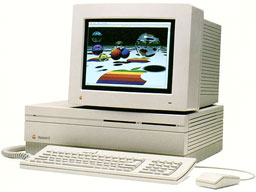 The IIfx was built on a 40 MHz motherboard and had the fastest clocked CPU that Apple used until the Quadra 840av of 1993. NuBus cards still ran on a 10 MHz bus, which is one reason Apple announced its first accelerated video card, the 8•24GC, along with the IIfx. Regular video cards were simply overshadowed by the rest of the system.
With a nod to it’s Apple II ancestors, the IIfx had two 6502 CPUs to manage the floppy drive(s), ADB port, and serial ports (seeTechnote HW 09 for more details). Unlike the 1 MHz Apple II computers, these CPUs ran at 10 MHz.
The IIfx introduced latched read/write RAM to the Apple lexicon. Using a 64-pin SIMM different from that in any other Macintosh, the IIfx could overlap read and write operations. (Byte, 4/90, p. 112)
The IIfx requires a special “black” SCSI terminator to accommodate its unusual architecture (seeTechnote DV 15 for more details).
- Got a Mac II or other vintage Mac? Join our Vintage Macs Group or Vintage Macs Forum.
- Our System 6 List and System 6 Forum are for those using Mac System 6.
There is a ROM SIMM slot on the Mac IIfx which must be filled with a IIfx ROM. Without this ROM, the computer will not function.
Although appearing identical to the Mac II and IIx, the IIfx power supply has a variable speed fan to better control noise and cooling.
Upgrade Advice
Accelerators are almost unknown for the IIfx, especially six years after it was discontinued.
- IIfx RAM is relatively costly, but you should have at least 8 MB. When upgrading, consider putting as much in one bank as possible, leaving the other bank for future expansion.
- An accelerated video card can make a world of difference, particularly if you use 16-bit or 24-bit modes or a monitor larger than 640 x 480 pixels. See our NuBus Video Card Guide for lots of information.
- A newer hard drive will be larger and faster than the one Apple shipped with the computer, but you won’t be able to take full advantage of that speed on the IIfx without a SCSI accelerator.
- More RAM plus Speed Doubler equals improved hard drive performance through intelligent caching.
Because it uses oddball memory and has some unusual circuitry, we label the IIfx a Limited Mac.
Details
- introduced 1990.03.19 at $9,900; discontinued 1992.04.15
- code names: F-16, F-19, Stealth, Blackbird, Zone 5, Four Square, IIxi, Weed Whacker
- model no.: M5525
- Gestalt ID: 13
Mac OS
- requires System 6.0.5 to 7.6.1
- addressing: 24-bit or 32-bit
Core System
- CPU: 40 MHz 68030
- FPU: 40 MHz 68882 FPU
- bus: 40 MHz – fastest until Quadra 840av
- ROM: 512 KB
- RAM: 4 MB, expandable to 128 MB using both 4-SIMM banks of 80ns 64-pin memory; can use 1 MB, 4 MB, 8 MB, and 16 MB SIMMs (the IIfx was the only Mac to use 64-pin SIMMs)
- L2 cache: 32 KB
Performance
- 6.8, relative to SE
- 4.60, MacBench 2.0 CPU
- 11.45, Speedometer 3.06
- 0.71, Speedometer 4
- 10.0 MIPS
- see Benchmarks: IIfx for more details
Graphics
- video: requires video card – see our NuBus Video Card Guide for more information.
Drives
- hard drive: 40, 80, or 160 MB SCSI
- floppy drive: 1.4 MB double-sided
- internal bay for second floppy drive
Expansion
- ADB ports: 2
- serial ports: 2 DIN-8 RS-422 ports on back of computer
- SCSI ports: DB-25 connector on back of computer
- sound: 8-bit stereo
- NuBus slots: 6
- one PDS slot (inline with a NuBus slot)
Physical
- size (HxWxD): 5.5″ x 18.7″ x 14.5″
- weight: 24 lb.
- PRAM battery: 3.6V half-AA
- power supply: 230W
話說,要買日本的筆記型電腦的話,第一品牌當然是「Lenovo」!
由於SONY已經擺明賣掉VAIO,只剩下Toshiba跟Fujitsu是比較好的選擇,其他的Panasonic、NEC連日本都買得很差!更不用說是國外!
如果你不考慮「就算是一年保固期內」萬一「電腦壞掉還要送回日本原廠維修」,以及幾乎都是「日文鍵盤」,還是堅持要買日本品牌的電腦的話,建議選擇「富士通」! 以你的預算來看,應該可以在富士通這幾台選一台你想要的款式。

其實「日本Apple」有提供英文鍵盤可以選購,但我就是只要「日本語鍵盤」我才不要英文鍵盤!但如果你用不慣日文鍵盤,還是可以外接USB的英文鍵盤。
由於Apple有「全球保固」所以無論我在哪裡買電腦,在哪裡送修電腦,都完全沒問題!但如果是日本品牌,全部都只能對應日本國內,國外完全不保固!就算你送到「中國富士通」也沒用!絕對保證不受理任何修理!其他的東芝、SONY,甚至是相機的Canon、Nikon也全部都一樣!


