View photo
0
159
_DSC2135.NEF
_DSC2135
Photo EXIF Info
 | NIKON D90 |
 | AF Micro-Nikkor 60mm f/2.8D |
  | On, Return not detected |
 | Manual (M Mode) |
 | f/11 |
 | 1/125 Sec |
 | ISO 250 |
 | Auto (AWB) |
| Camera Make | NIKON CORPORATION |
| Camera Model | NIKON D90 |
| User Comment | Getsufuki Tomoya soulik.info |
| Lens | AF Micro-Nikkor 60mm f/2.8D |
| Focal Length | 60 mm |
| Focal Length In 35mm | 90 mm |
| Exposure Program | Manual (M Mode) |
| Exposure Value | 0 EV |
| Exposure Time | 1/125 Sec |
| Aperture Size | f/11 |
| ISO | 250 |
| White Balance | Auto (AWB) |
| Picture Style | Vivid |
| High ISO Noise Reduction | Off |
| Flash | On, Return not detected |
| Flash Compensation | 0 EV |
| Flash Mode | Fired, TTL Mode |
| Shutter curtain sync | Rear Curtain Sync |
| Flash Type | Commander mode |
| Flash Commander Mode | On |
| Flash Control Mode | Off |
| Metering Mode | Multi-segment |
| Focus Mode | AF-A |
| AF-Area Mode | Auto Area AF mode |
| Center Focus Point | Normal Zone |
| Phase Detection-AF | On (11 Points) |
| Shooting Mode | Single frame |
| Shutter Count | 54011 |
| Record Type | RAW |
| Quality | Normal |
| Color Space | Adobe RGB |
| Software | Ver.1.01 |
| Resolution | 300x300 dpi |
| Photo Size | 4352x2868 Pixel |
| Shooting Time | August 08, 2018(Sunday) 15:45:07 |
Comments
Order by:
Per page:

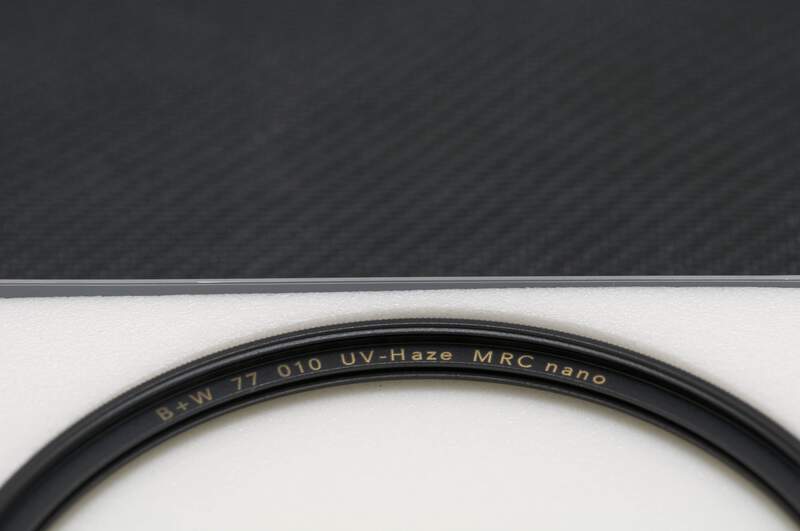
進藤ヒカル: 這次對焦還是有一點偏移,所以濾鏡上面的金色的字,會比較不夠銳利。
 普通的DSLR通常只有中間的一個對焦點性能最好,其他的對焦點都是輔助對焦點...
如果是Canon EOS 5D Mark IV,因為有「F2.8:5点、最大41点のクロス測距」所以可以達到「5點」的十字的測距點!

雖然是「5點」的十字的測距點,但還是會有對焦錯誤的時候!因為你想要對焦的「黑色的背景,金色的字」反差太小,旁邊的「黑白物體」的反差很大,所以會很自然對焦在「白色物體邊緣」。
這不是「換更好的DSLR」就可以解決的問題。
所以在這種對焦困難的情況,有兩個方式可以解決...
1. 使用手動對焦。新的DSLR的Live View可以放大影像到100%,這樣就會比較容易對焦。我想你可能不會想要使用「マグニファイヤー DG-2」。但是在Live View以前,我們都只能使用「DG-2」來對焦。

2. 手動移動「被写体」。
只要知道相機的對焦系統,會對焦在「黑白」的邊緣,就在對焦好以後,再把「被写体」往上推一點,或是相機的鏡頭往下移動一點,這樣就可以解決。我現在常用的EOS 5D、EOS Kiss Digital X都沒有Live View,所以我其實都是使用「相機的鏡頭往下移動一點」(有時候要往上移動一點,要看對焦的位置)來解決這個問題。

2018/08/28 0 points


© 2026 YourCompany